Behind the scenes
How this site was built
Jo's family wanted one place where everyone who knew her could leave a memory without making an account, installing anything, or being good with computers. Many of the people sharing are over 70 and on a phone, so every choice starts there.
By Rob Wray, Jo's son. Why I built it.
- 3 daysto build the first version, November 2–4, 2026
- 37pull requests in those three days
- 1,200+automated tests
- 0accounts to make
The trip a memory takes
You share.
Type a few words, record your voice, or pick photos and videos. No account needed.
Your words are saved.
Your name, your words and when you sent them go into the family's database.
Files go straight to private storage.
Photos, videos and recordings travel directly from your phone to a private store. Each file is checked to make sure it really is a photo, video or recording, and photos get a web-sized copy with the location data removed.
You get a private link.
It's on the thank-you screen and in an email, so you can come back to fix a typo or add a photo.
The family reads it.
Jo's family gets a note that a memory arrived and reads it on their private page.
What runs where
Your phone or computer
The share page, the recorder and the uploads, all in your web browser.
The website, on Vercel
Next.js 16 and React 19: the pages, the code that saves memories, the upload and media routes, and the ten-minute background job.
Neon Postgres
Memories, names and their edit history.
Vercel Blob
Photos, videos and recordings, kept private. Uploads arrive here straight from your browser.
SendGrid
Your receipt and the family's alert.
Sentry
Error reports and recordings of visits, so problems get fixed fast.
How Rob and AI built it
The first version took three days and 37 pull requests. Rob decided what to build and made every call about Jo. AI coding agents, mostly Anthropic's Claude with OpenAI's Codex on some features, planned, built, tested and documented the work, and independent AI reviewers checked it.
Rob decides.
What the site should do, how it should feel, and every call about Jo.
A written plan.
An agent writes a plan with Rob's decisions quoted word for word, plus a "premortem": imagine it failed, then ask why.
Built on its own branch.
Every change, even an urgent fix, gets its own branch, with tests written first for the risky parts like uploads and email.
Reviewed.
A fresh AI reviewer reads the whole change, and for bigger changes two more AI models, Google's Gemini and OpenAI's Codex, review it independently.
Rob approves, and it ships.
Automated checks must pass before anything reaches the live site.
Made for Jo's people
- Large text in Atkinson Hyperlegible, a typeface made for low-vision readers.
- Big buttons, and nothing hidden behind a hover.
- iPhone photos work as they are, including Apple's HEIC format.
- The heart is the logo because Jo's maiden name was Hart.
Built with
- Next.js 16
- React 19
- TypeScript
- Tailwind CSS 4
- Prisma 7
- Neon Postgres 18
- Vercel (hosting, Blob storage, cron)
- SendGrid
- Sentry
- sharp and heic-decode (libheif in WebAssembly)
- Vitest
- Claude Code
Privacy, in plain words
- Your private link lets you see, correct or add to your memory. The site's database keeps only a scrambled fingerprint of the link, never the link itself. Jo's family can also make corrections from their private page.
- Files sit in private storage. Photos are shown from a copy with the location data removed. Videos and voice recordings are shared as they were recorded, so anyone who saves one can see what the phone stored with it, which can include where and when it was recorded and which phone made it.
- The family reads every memory before it appears on See memories.
- One honest note: during this early version, Rob uses detailed error reports and recordings of visits, including what people type and the photos on screen, to find and fix problems. Reports can include your name and email address. The family approved this. Some recordings, and screenshots sent with a problem report, can include private links.
For the technically curious
The detailed version
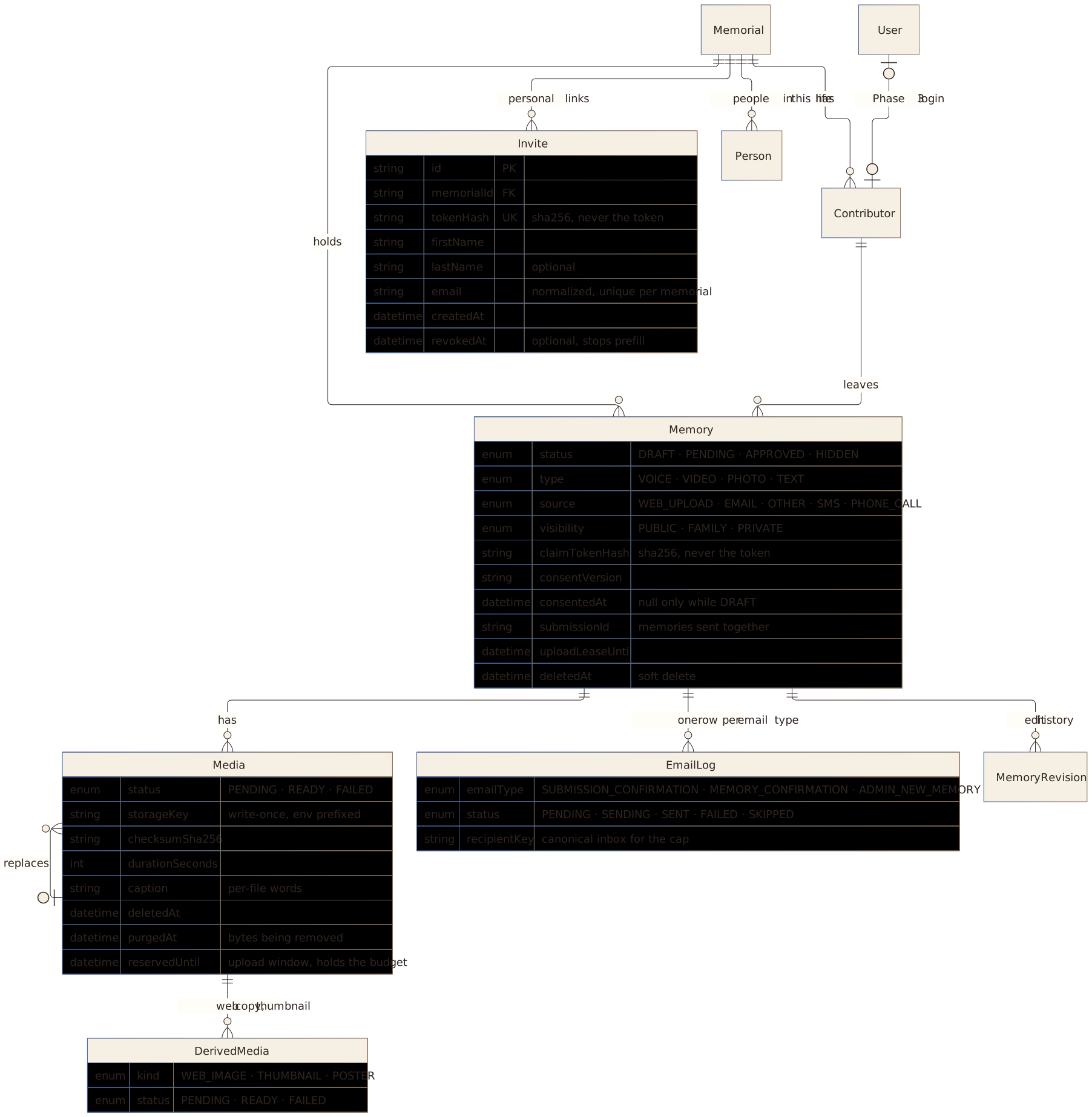
The pictures above are the simple version. These three are the ones the programmers use, from the project's README on GitHub. Each one fits the screen: zoom in to read the small print, drag to move around once zoomed in, or open it full screen.
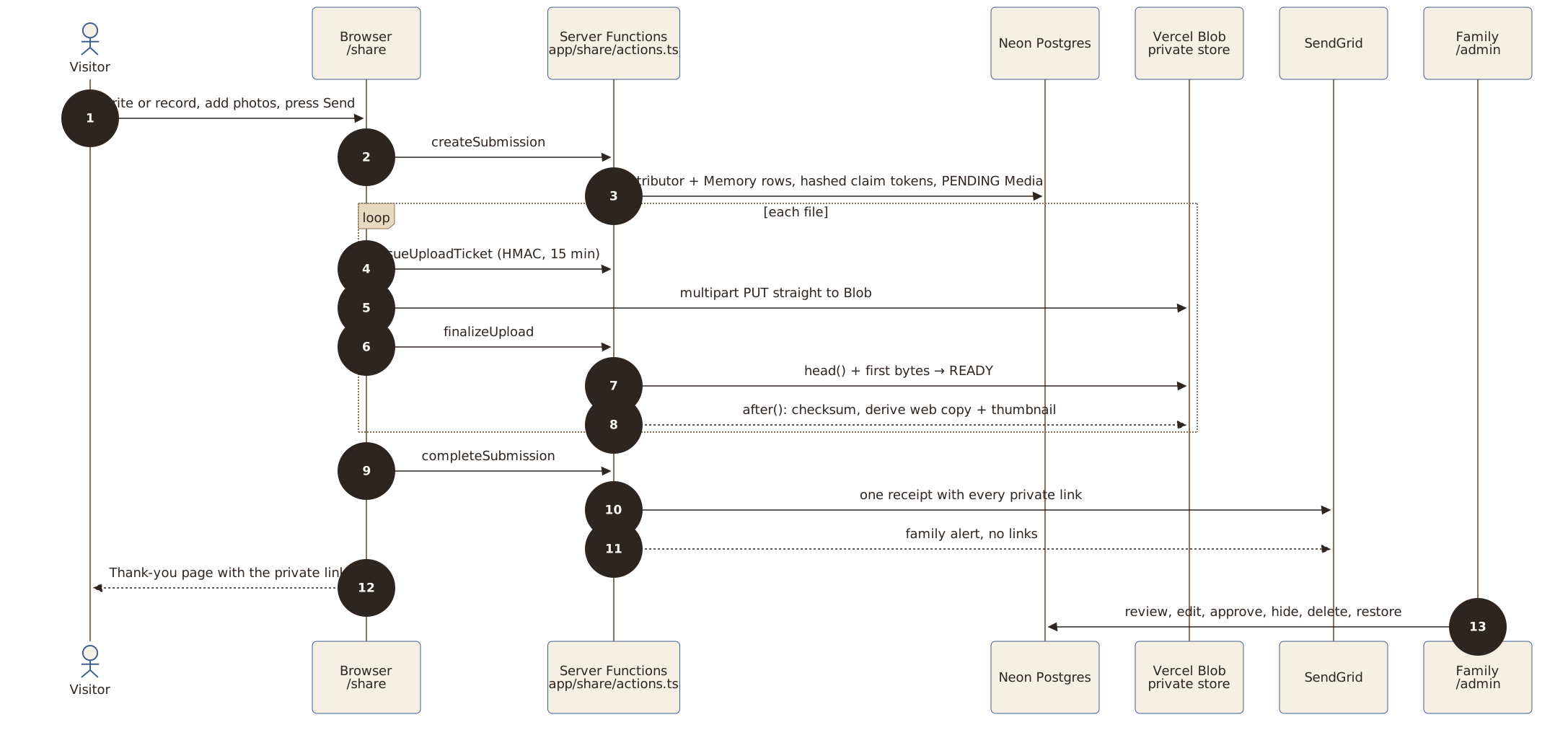
How a memory travels
What happens after someone presses Send: the memory is saved in Neon Postgres, each file goes from the browser straight to private Vercel Blob storage and is checked before it counts, and SendGrid sends one receipt with every private link and a family alert with none.
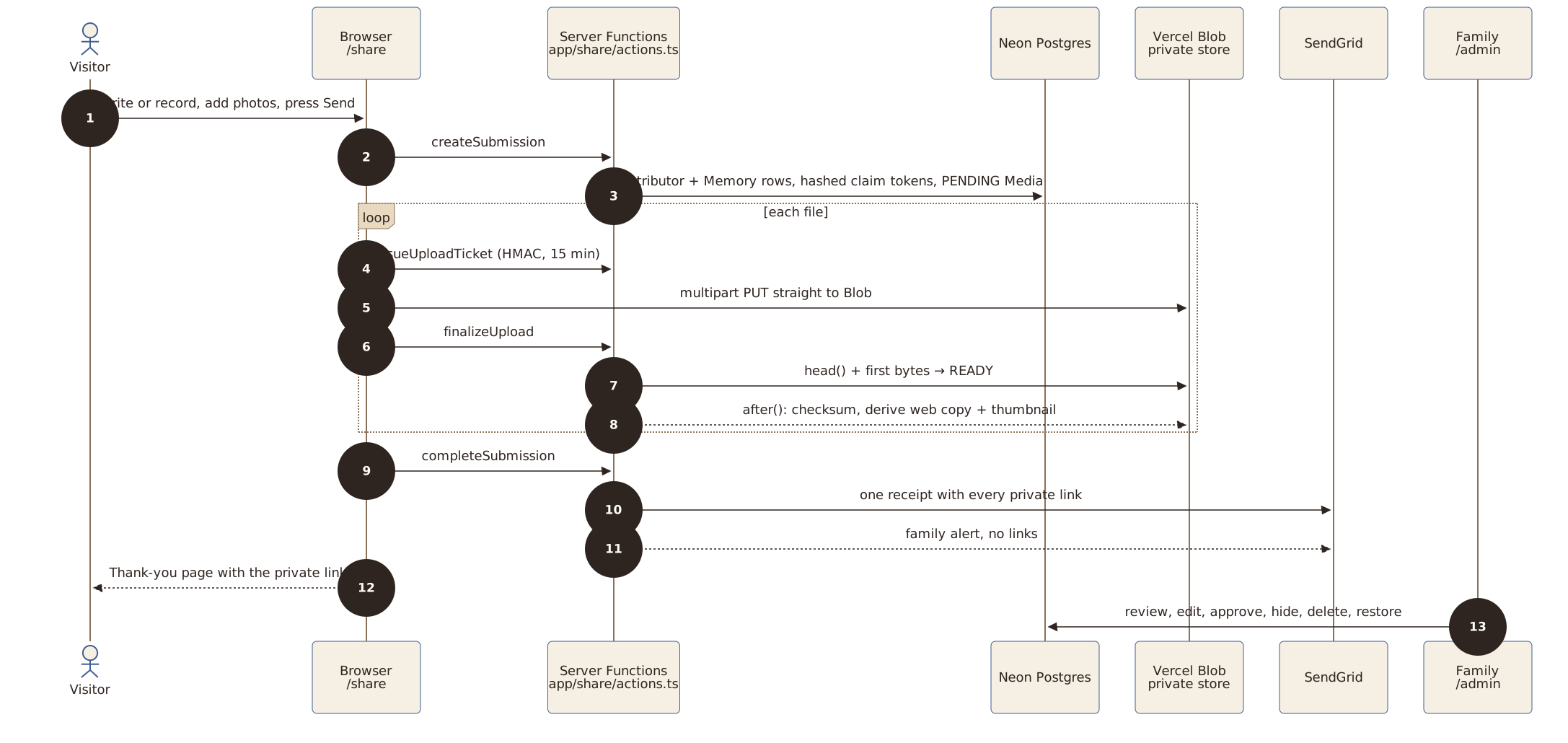
Open “How a memory travels” full sizeRead “How a memory travels” in the README on GitHub
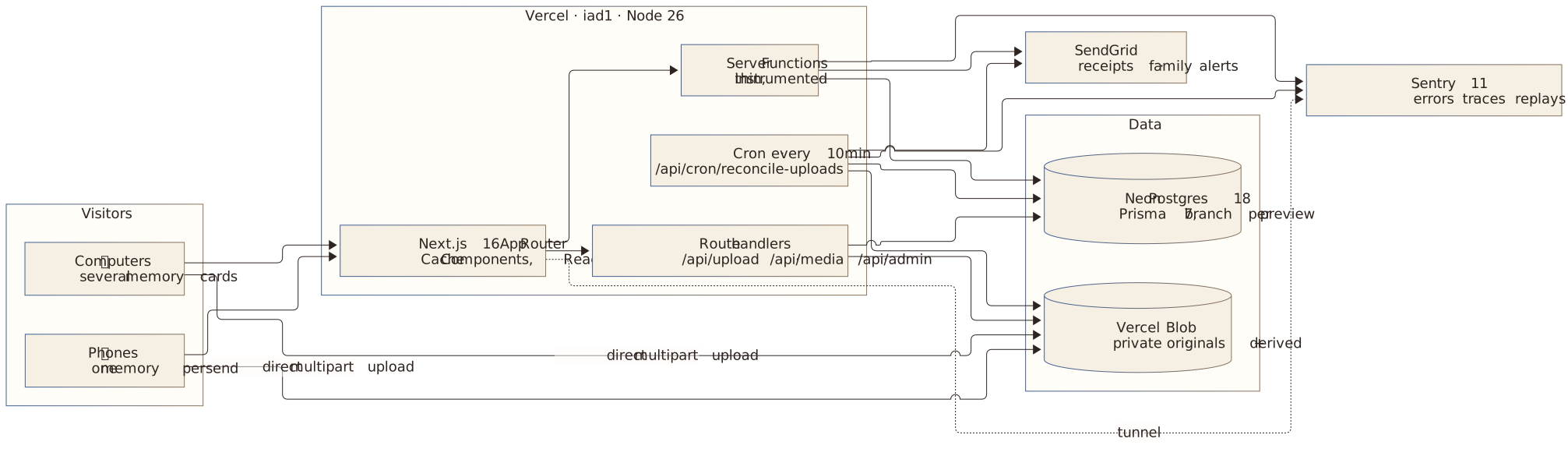
Architecture
Where each part runs: the Next.js site on Vercel, with its Server Functions, upload routes and ten-minute background job, uses Neon Postgres, Vercel Blob, SendGrid for email and Sentry for error reports. Uploads never pass through the site's own servers.
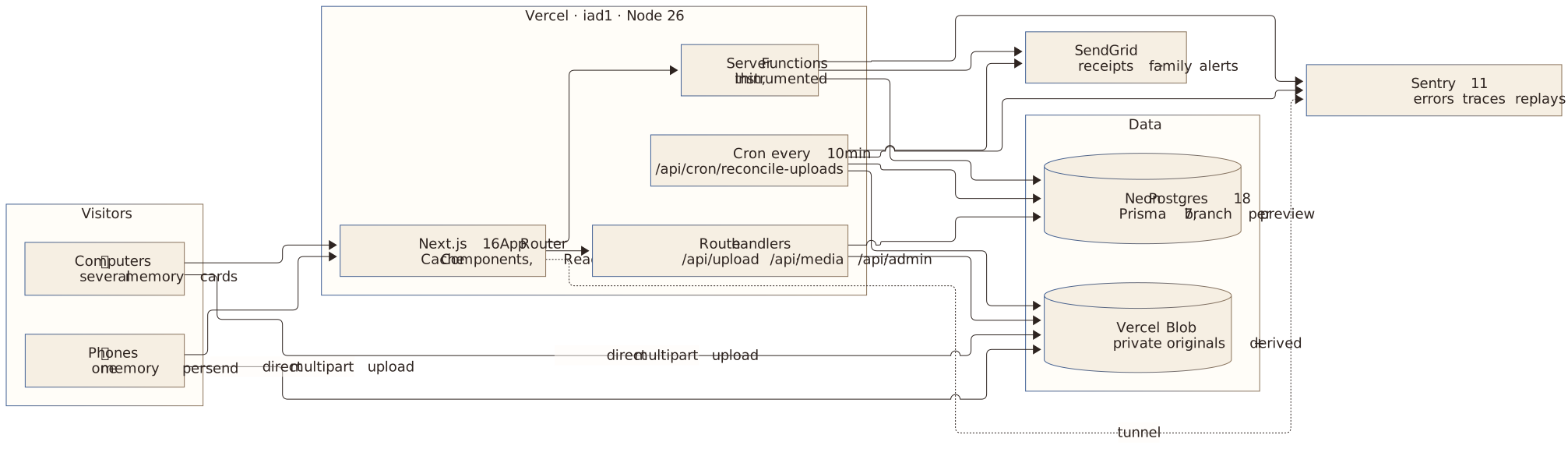
Open “Architecture” full sizeRead “Architecture” in the README on GitHub
Data model
The main database tables and how they connect. The database keeps only a fingerprint (SHA-256) of each private link, never the link itself; the User table is for logins, which come in Phase 3.
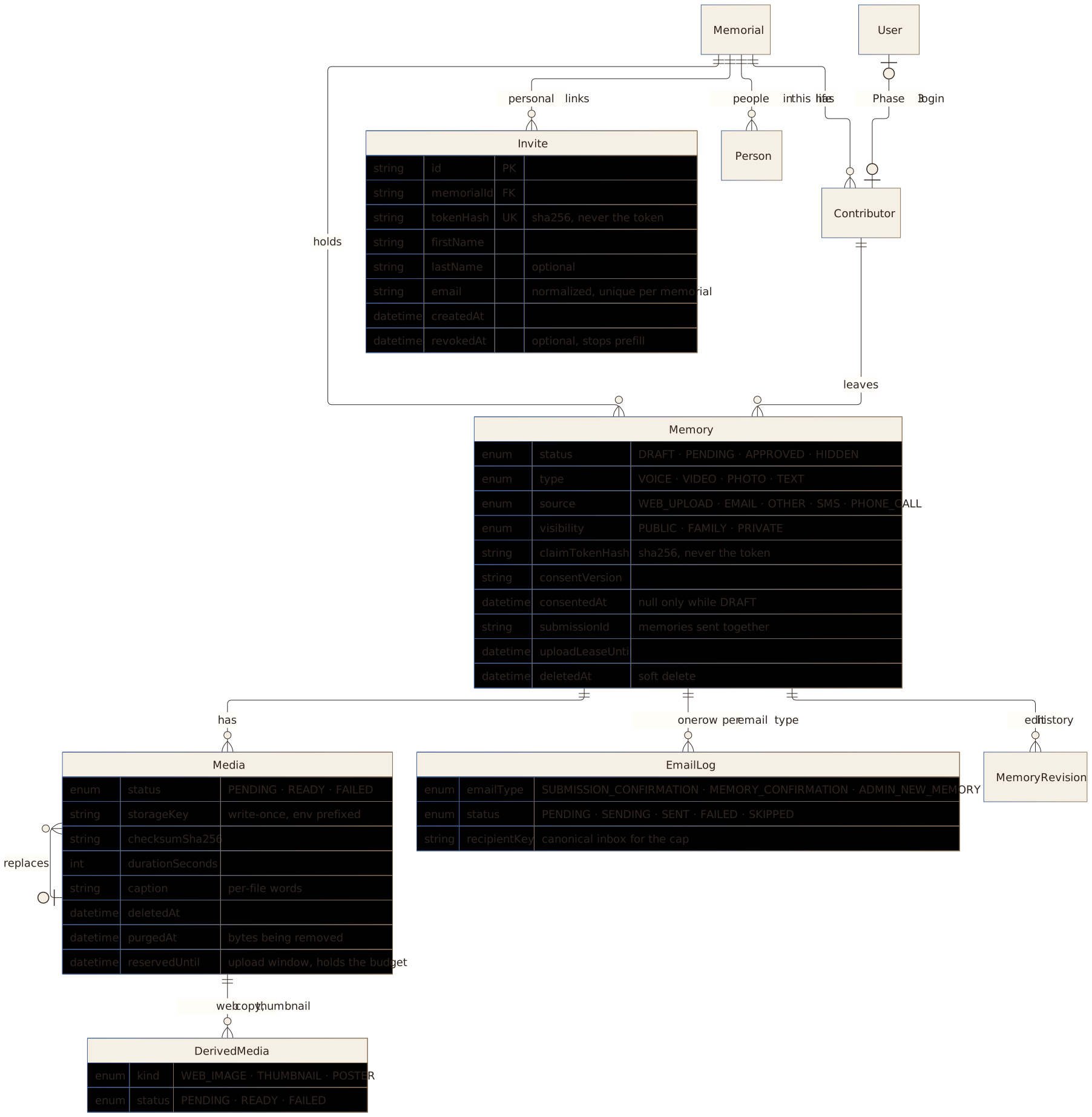
Open “Data model” full sizeRead “Data model” in the README on GitHub
The code is open
The code, the plans and the decisions are on GitHub.